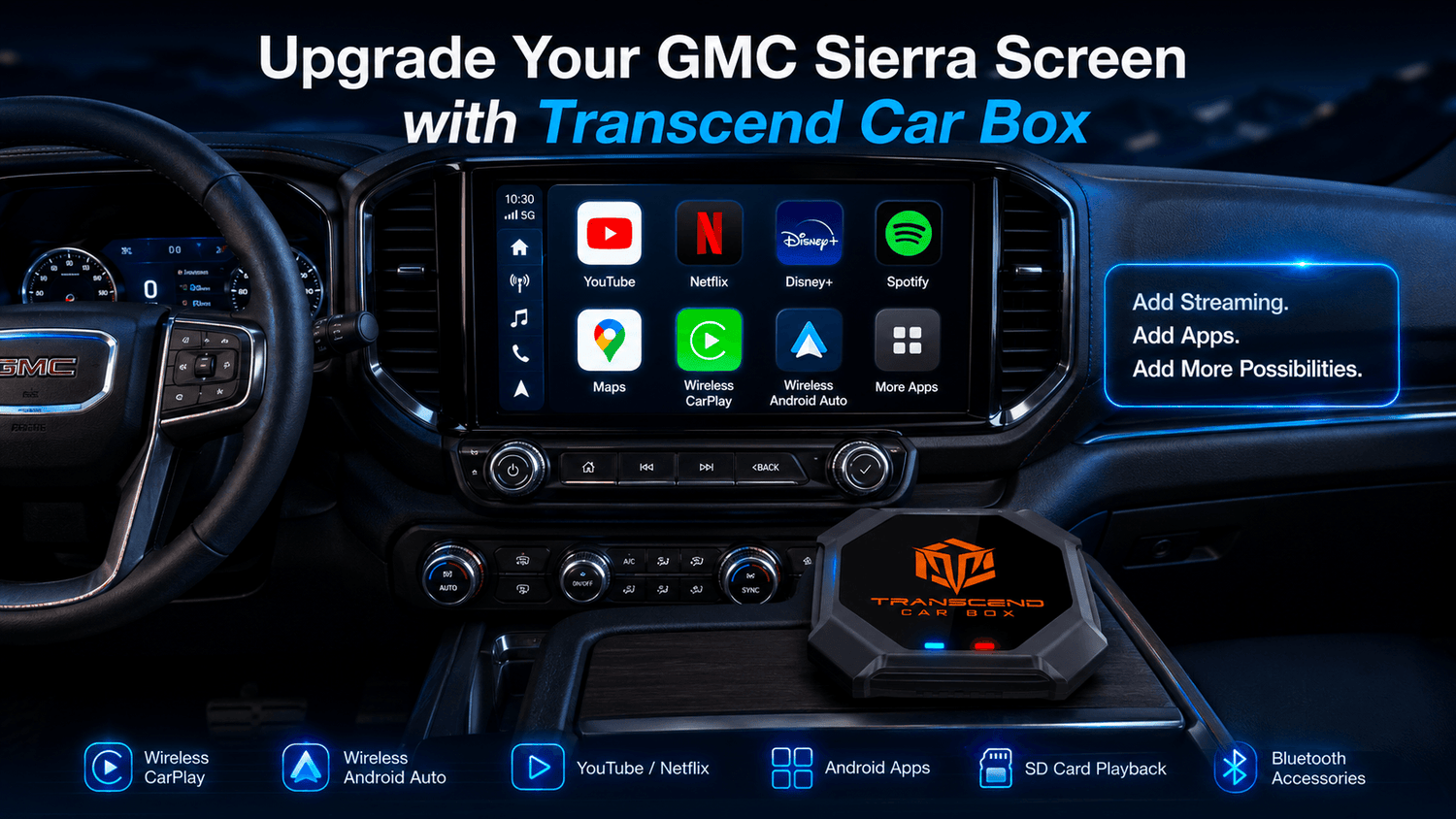
The GMC Sierra is built for more than daily driving. For many owners, it is a work truck, towing vehicle, road trip partner, camping setup, and family hauler.
Many GMC Sierra and Sierra HD models come with a capable infotainment screen. But standard Apple CarPlay and Android Auto are still limited when it comes to entertainment apps, Android apps, offline video playback, and full screen flexibility.
That is why many Sierra owners ask:
Can I add YouTube, Netflix, Disney+, Android apps, wireless CarPlay, wireless Android Auto, or SD card offline playback to my GMC Sierra screen?
A CarPlay AI Box may be the answer — but compatibility matters.
Transcend Car Box may work with GMC Sierra models that support wired CarPlay or wired Android Auto through a USB data connection. GMC’s own support pages explain that both Apple CarPlay and Android Auto can connect through the vehicle’s USB data port on compatible vehicles, which is why USB data support is the key compatibility point for a CarPlay AI Box.
Video apps should only be used when the vehicle is parked or by passengers where legally allowed. Drivers should never watch videos while driving.
Quick Answer: Does a CarPlay AI Box Work with GMC Sierra?
Transcend Car Box may work with GMC Sierra models that support wired CarPlay or wired Android Auto through a USB data connection.
The easiest way to check is simple:
Connect your iPhone or Android phone to your GMC Sierra USB data port using a data cable. If Apple CarPlay or Android Auto launches on the infotainment screen, your Sierra may be compatible with a CarPlay AI Box.
However, not every GMC Sierra is automatically compatible.
Compatibility may depend on:
- Model year
- Sierra / Sierra HD / Sierra EV version
- Trim level
- Infotainment system
- USB port type
- Whether the USB port supports data transfer
- Whether wired CarPlay or wired Android Auto launches normally
- Vehicle software or firmware
Bluetooth alone is not enough. A charging-only USB port is not enough. USB music playback is also not the same as wired CarPlay or wired Android Auto.
For a CarPlay AI Box, the key question is not simply whether your truck has a large screen. The key question is whether your GMC Sierra can launch wired CarPlay or wired Android Auto through USB.
GMC Sierra, Apple CarPlay, Android Auto, and USB Data Ports
Different GMC Sierra models can have different infotainment setups depending on year, trim, and equipment.
Some Sierra models may support wired smartphone projection. Some may support wireless Apple CarPlay or wireless Android Auto. Some may have several USB ports, but not every USB port necessarily works the same way.
For a CarPlay AI Box, the most important connection is a working USB data port.
GMC’s Apple CarPlay support page says users can connect an iPhone to the vehicle’s USB data port using a USB-A or USB-C cable, depending on the model. GMC’s Android Auto support page also describes connecting an Android phone to the vehicle’s USB data port with a phone cable.
That means the best compatibility test is practical:
Plug in your phone and see whether wired CarPlay or wired Android Auto starts on the GMC Sierra screen.
A large infotainment screen does not automatically mean a CarPlay AI Box will work. Bluetooth pairing does not automatically mean compatibility either. The USB data connection is the part that matters most.
Important Note About GMC Sierra EV
GMC Sierra EV models may be different from gas or diesel GMC Sierra trucks.
GMC’s official Sierra EV page states that Apple CarPlay is not available in the 2026 GMC Sierra EV. Because of that, Sierra EV owners should not assume compatibility with a CarPlay AI Box.
This guide is mainly for GMC Sierra and GMC Sierra HD models that support wired CarPlay or wired Android Auto through USB.
If you drive a GMC Sierra EV, check your vehicle’s official smartphone projection support before ordering. Do not assume compatibility based only on the Sierra name.
How to Check If Your GMC Sierra Is Compatible
Before buying Transcend Car Box for your GMC Sierra, use this compatibility checklist.

1. Identify Your GMC Sierra Model
Start with the basic vehicle information:
- Model year
- Sierra, Sierra HD, or Sierra EV version
- Trim level
- Infotainment screen size
- Factory screen or aftermarket head unit
- Gas, diesel, HD, or EV setup
This information helps support teams understand your setup, but it is not enough by itself. The real test is whether wired CarPlay or wired Android Auto works through USB.
2. Test Wired CarPlay with an iPhone
Connect your iPhone to the GMC Sierra USB data port with a high-quality data cable.
Then check whether Apple CarPlay appears on the infotainment screen.
If Apple CarPlay launches normally through USB, your GMC Sierra may be compatible with Transcend Car Box.
If the phone only charges, or the screen does not detect CarPlay, try another USB port if available. Some ports may be for charging only.
3. Test Wired Android Auto with an Android Phone
Connect your Android phone to the GMC Sierra USB data port using a reliable data cable.
If Android Auto launches on the infotainment screen, your Sierra may be compatible with a CarPlay AI Box.
If Android Auto does not start, check your Android Auto settings, phone permissions, cable, USB port, and vehicle settings.
4. Make Sure You Are Using a USB Data Port
This is one of the most important steps.
Some vehicles have multiple USB ports. One port may support data transfer, while another may only charge the phone.
For Transcend Car Box, the USB port must support data communication with the infotainment system.
A charging-only port will not work.
GMC’s quick start guide also notes that some models may offer wired Apple CarPlay and wired Android Auto through USB Type-C ports, depending on vehicle configuration.
5. Check Infotainment Settings and Software
If wired CarPlay or Android Auto does not launch, check your GMC infotainment settings.
Look for settings related to:
- Apple CarPlay
- Android Auto
- Phone projection
- Smartphone connection
- USB connection
- Device management
- Vehicle software updates
Sometimes the feature may need to be enabled or approved on the screen.
6. Contact Support If You Are Unsure
Before ordering, prepare the following information:
- GMC Sierra model year
- Trim level
- Screen photo
- USB port photo
- Whether wired CarPlay works
- Whether wired Android Auto works
- Whether the phone only charges
- Any error message shown on the screen
This information can help confirm whether Transcend Car Box is likely to work with your truck.
For more information, read our full compatibility guide.
What Can Transcend Car Box Add to a GMC Sierra Screen?
If your GMC Sierra is compatible, Transcend Car Box can make your truck screen more flexible.
Instead of using only standard Apple CarPlay or Android Auto, you can access an Android-based system through the CarPlay AI Box.

Depending on your setup, Transcend Car Box can support:
- Wireless CarPlay
- Wireless Android Auto
- YouTube
- Netflix
- Disney+
- Kodi
- Android apps
- Music apps
- Navigation apps
- SD card offline video playback
- Bluetooth accessories
- Plug-and-play USB connection
A GMC Sierra already has a capable truck screen. Transcend Car Box can help make a compatible screen more useful for parked entertainment, apps, offline media, and wireless smartphone connection.
For daily driving, you can use wireless CarPlay or wireless Android Auto. When parked, passengers can use video apps, Android apps, or offline media depending on your setup.
Can You Watch YouTube or Netflix on a GMC Sierra Screen?
Native Apple CarPlay and Android Auto are designed mainly for driving-friendly apps such as navigation, calls, messages, music, podcasts, and audiobooks.
They do not normally show video streaming apps like YouTube, Netflix, Disney+, Prime Video, or other movie apps directly on the car screen.
A CarPlay AI Box works differently. It provides an Android-based system on a compatible vehicle screen. With a compatible GMC Sierra setup, Transcend Car Box may allow access to apps such as YouTube, Netflix, Disney+, Kodi, and more.
Want to learn more about Streaming on Apple CarPlay? Click here for more information.
GMC Sierra Use Cases: Work, Towing, Road Trips, and Camping
The GMC Sierra is often used for more than simple commuting.
Many owners use their trucks for work, towing, outdoor trips, camping, family travel, and long-distance driving. That makes a smarter screen setup useful in real life.
Work Truck Breaks
Some Sierra owners spend a lot of time waiting between job sites, service calls, deliveries, or outdoor work.
When parked, Transcend Car Box can make the cabin more comfortable with music apps, navigation apps, video apps, and offline media.

Towing and Long-Distance Travel
For towing trips, long drives, and highway travel, passengers may want entertainment during stops or breaks.
A compatible GMC Sierra screen with Transcend Car Box can support video apps, music apps, and navigation options in one setup.
Road Trips and Camping
GMC Sierra owners often use their trucks for camping, tailgating, fishing, and road trips.
In weak signal areas, SD card offline playback can be especially useful. You can prepare offline videos before the trip instead of relying only on mobile hotspot data or streaming apps.
Passenger Entertainment
For family travel, parked waiting time, or road trip breaks, passengers may want to watch YouTube, Netflix, Disney+, or offline videos.
Transcend Car Box can help turn a compatible GMC Sierra screen into a more flexible entertainment system.
Again, drivers should never watch videos while driving. Video apps should only be used while parked or by passengers where legally allowed.
Does Transcend Car Box Work with Every GMC Sierra?
It may work if your GMC Sierra supports wired CarPlay or wired Android Auto through a USB data connection. Transcend Car Box does not work with every GMC Sierra.

It may not work if:
- Your truck only supports Bluetooth
- Your USB port only charges
- Your screen only supports USB music playback
- Wired CarPlay does not launch through USB
- Wired Android Auto does not launch through USB
- Your infotainment system is restricted or unsupported
- Your Sierra EV does not support the required smartphone projection setup
- You are using the wrong USB port
The best way to check is to connect your phone by USB and confirm whether wired CarPlay or wired Android Auto launches normally.
What About Older GMC Sierra Models?
Older GMC Sierra models may not have factory Apple CarPlay or Android Auto support.
If your older Sierra has a factory infotainment system that does not support CarPlay or Android Auto, Transcend Car Box may not work with the original factory screen.
However, some older GMC Sierra owners install an aftermarket head unit.
If your aftermarket head unit supports wired CarPlay or wired Android Auto through a USB data connection, Transcend Car Box may be compatible with that head unit.
In this case, compatibility depends more on the aftermarket head unit than the original GMC factory screen.
The key question is still the same:
Does wired CarPlay or wired Android Auto launch through USB?
For more details, read our aftermarket head unit guide.
What to Check Before Buying for Your GMC Sierra
Before ordering Transcend Car Box for your GMC Sierra, check the following:
- What model year is your GMC Sierra?
- Is it Sierra, Sierra HD, or Sierra EV?
- Does wired Apple CarPlay work through USB?
- Does wired Android Auto work through USB?
This checklist can help reduce compatibility mistakes before purchase.
Why Choose Transcend Car Box for GMC Sierra?
Transcend Car Box is designed for drivers who want more than basic smartphone projection.
For compatible GMC Sierra screens, it can add entertainment, apps, wireless connectivity, and offline media playback in one device.
Key features include:
- Wireless CarPlay
- Wireless Android Auto
- YouTube
- Netflix
- Disney+
- Kodi
- Android apps
- SD card offline video playback
- Bluetooth accessories
- Plug-and-play USB connection
Transcend Car Box also includes strong hardware for a smoother experience:
- Qualcomm 665 processor
- 8GB RAM
- 128GB storage
- Android 13 system
It also comes with:
- Global free shipping
- 30-day return policy
- 365-day warranty
- 24-hour support
If your GMC Sierra supports wired CarPlay or wired Android Auto through USB, Transcend Car Box may be a strong upgrade for your truck screen.
FAQ
Does a CarPlay AI Box work with GMC Sierra?
A CarPlay AI Box may work with GMC Sierra models that support wired CarPlay or wired Android Auto through a USB data connection.
The best way to check is to connect your phone to the GMC Sierra USB data port and confirm whether CarPlay or Android Auto launches on the screen.
Does Transcend Car Box work with every GMC Sierra?
Compatibility depends on the model year, infotainment system, USB port, and whether wired CarPlay or wired Android Auto works through USB. Transcend Car Box does not work with every GMC Sierra.
Does Transcend Car Box work with GMC Sierra EV?
Do not assume compatibility.
GMC’s official Sierra EV page states that Apple CarPlay is not available in the GMC Sierra EV. Sierra EV owners should check official smartphone projection support before ordering.
Can I watch YouTube on my GMC Sierra screen?
With a compatible setup, Transcend Car Box can provide access to YouTube through its Android 13 system on your GMC Sierra screen.
Video apps should only be used when parked or by passengers where legally allowed.
Can I watch Netflix on my GMC Sierra screen?
With a compatible GMC Sierra setup, Transcend Car Box can provide access to Netflix through its Android-based system.
Can I use Transcend Car Box if my GMC Sierra only has Bluetooth?
Usually no. Bluetooth alone is not enough.
Transcend Car Box requires a compatible wired CarPlay or wired Android Auto USB data connection.
What if my GMC Sierra already has wireless CarPlay?
Wireless CarPlay alone does not always confirm CarPlay AI Box compatibility.
You should still check whether your GMC Sierra supports wired CarPlay or wired Android Auto through USB.
Is a basic wireless CarPlay adapter enough for my GMC Sierra?
If you only want to make wired CarPlay wireless, a basic wireless CarPlay adapter may be enough.
However, if you want YouTube, Netflix, Disney+, Android apps, SD card offline playback, wireless CarPlay, and wireless Android Auto on a compatible GMC Sierra screen, a CarPlay AI Box such as Transcend Car Box may be a better fit.
For a full comparison, read our CarPlay AI Box vs Wireless CarPlay Adapter guide:
Can I use SD card offline videos in my GMC Sierra?
Yes. Transcend Car Box supports SD card offline video playback, depending on file format and setup.
This can be useful for road trips, camping, work breaks, towing stops, weak signal areas, or parked passenger entertainment.
Does Transcend Car Box work with older GMC Sierra trucks?
Older GMC Sierra trucks may not support factory CarPlay or Android Auto.
If your older GMC Sierra has an aftermarket head unit that supports wired CarPlay or wired Android Auto through USB, Transcend Car Box may be compatible with that head unit.
Can I watch videos while driving?
Transcend Car Box support playing videos while driving. But drivers should never watch videos while driving.Video apps should only be used when the vehicle is parked or by passengers where legally allowed.
Final Recommendation
If your GMC Sierra supports wired CarPlay or wired Android Auto through a USB data connection, Transcend Car Box may be a useful upgrade for your truck screen.
It can add wireless CarPlay, wireless Android Auto, YouTube, Netflix, Disney+, Kodi, Android apps, SD card offline video playback, Bluetooth accessories, and more to a compatible GMC Sierra display.
Before ordering, test your USB connection and confirm that wired CarPlay or wired Android Auto launches normally.
For Sierra EV owners, do not assume compatibility. Check official vehicle smartphone projection support first.
For work breaks, towing stops, road trips, camping, family travel, and parked entertainment, Transcend Car Box can make a compatible GMC Sierra screen more flexible !

コメントを書く
全てのコメントは、掲載前にモデレートされます
このサイトはhCaptchaによって保護されており、hCaptchaプライバシーポリシーおよび利用規約が適用されます。